When two policies allow and the request still fails
S3 returns AccessDenied even when the bucket and IAM policies both allow. Here is the five-gate evaluation order and where the hidden deny sits.
The short version
- An S3 request is not authorised by a policy that says
Allow. It is authorised by five checks that must all pass, in a fixed order. - A single explicit
Denyat any layer wins, including a deny you cannot see because it lives in an organisation policy, not on the bucket. - Inside one AWS account, an allow in either the IAM policy or the bucket policy is enough. Across two accounts it is not: both must allow, and that is the most common cause of a "but I gave permission" ticket.
- S3 answers
AccessDeniedfor almost all of these failures, with no hint about which gate closed. You are expected to find it yourself. - The cost is usually measured in hours of debugging, and occasionally in a production job that fails silently at 3 a.m.
What actually happens
People picture authorisation as a question put to one document. In S3 the question is asked of a chain, and the chain short-circuits on the first refusal. The order matters because it tells you where to look when the answer is no.
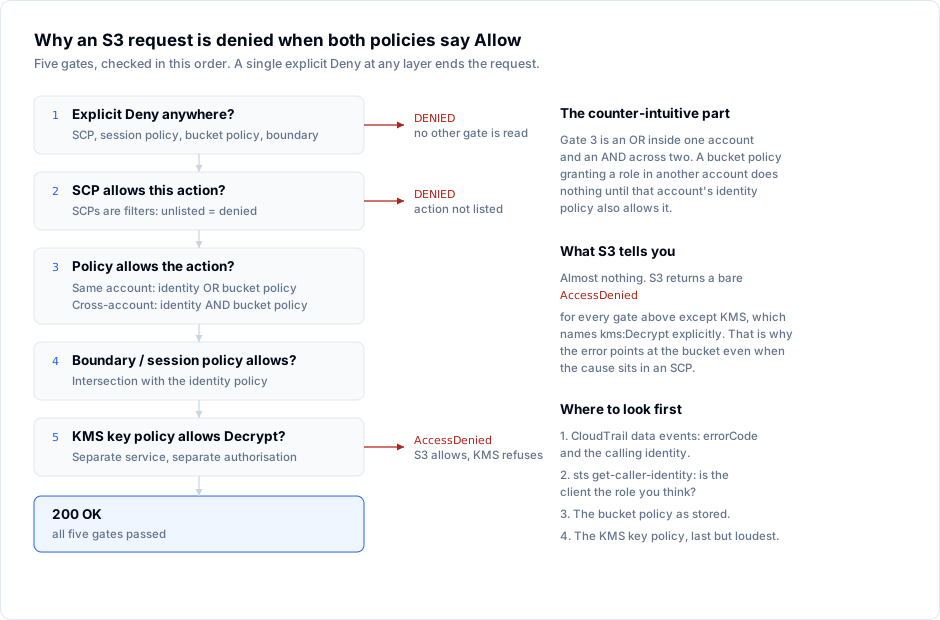
The five gates, in order:
- An explicit
Denyanywhere. Service control policies, session policies, the bucket policy, a permissions boundary. OneDenyends the request. Nothing after this point is consulted. (ACLs are grants only — they cannot carry aDeny, so they never appear at this gate.) - The organisation's service control policy must list the action. SCPs are not grants; they are filters. If
s3:GetObjectis not in an allowed statement, the call fails even when every other policy is permissive. - The identity or resource policy must allow it — see the same-account/cross-account distinction below.
- A permissions boundary or session policy must not exclude it. These are intersections: the effective permission is the intersection of the boundary and the identity policy, never the union.
- For encrypted objects, the KMS key policy must allow the key operation. This is a separate service with its own authorisation. S3 checks
s3:GetObject; KMS then checkskms:Decrypt.
The distinction in gate 3 is the one that costs people days:
| Situation | Identity policy (caller's account) | Bucket policy | Result |
|---|---|---|---|
| Same account | Allow | anything | allowed |
| Same account | anything | Allow | allowed |
| Cross-account | Allow | Allow | allowed |
| Cross-account | Allow | absent | AccessDenied |
| Cross-account | absent | Allow | AccessDenied |
Cross-account access is an AND. You have to grant twice: once to the principal in its own account, and once in the bucket policy naming that principal. Teams routinely do the second and assume the first is implied.
Where it bites
The bucket policy looks perfect. It names arn:aws:iam::111122223333:role/etl-runner and grants s3:GetObject on arn:aws:s3:::warehouse-prod/*. The ETL job still gets AccessDenied. The role in account 111122223333 has no identity policy granting s3:GetObject on warehouse-prod. Gate 3 failed on the AND, and S3 reports it identically to a missing bucket policy.
The deny is in an SCP nobody remembered. A guardrail blocks s3:* on buckets whose names do not end in an approved suffix. The bucket policy allows everything. The request dies at gate 2 and the error text still says AccessDenied on the bucket.
The KMS error is the only honest one. When encryption is aws:kms and the key policy omits the caller, you get a message that names the operation:
An error occurred (AccessDenied) when calling the GetObject operation:
User: arn:aws:sts::111122223333:assumed-role/etl-runner/session
is not authorized to perform: kms:Decrypt on resource:
arn:aws:kms:eu-west-1:111122223333:key/8f2c... because no identity-based
policy allows the kms:Decrypt action
That wording tells you the gate. Everything else returns:
An error occurred (AccessDenied) when calling the GetObject operation: Access Denied
Block Public Access refuses a policy you can see. A bucket policy that grants Principal: "*" on a bucket with public access blocking enabled is either rejected at save time or neutralised at evaluation. The policy document exists, reads as permissive, and authorises nothing.
The client is not running as the role you think. A stale AWS_PROFILE, an instance role inherited from a different launch template, a ~/.aws/credentials file that outranks the environment. The policies are correct for a principal that is not the one calling.
Doing it right
Step 1 — establish the real principal. Before reading any policy, ask the client:
aws sts get-caller-identity
If this is not the account and role you assumed, stop. Nothing else in the investigation is meaningful.
Step 2 — read the bucket policy as stored, not as remembered.
aws s3api get-bucket-policy --bucket warehouse-prod --query Policy --output text | jq .
Check three things: the Principal ARN (exact, no wildcard), the resource ARN (does it end in /* for objects?), and whether a Deny statement exists anywhere in the document.
Step 3 — read the identity policy in the caller's account. This is the half people forget on cross-account setups.
aws iam list-attached-role-policies --role-name etl-runner
aws iam list-role-policies --role-name etl-runner
Step 4 — find the request in CloudTrail data events. This is the only view that tells you which principal actually made the call and what error S3 returned. Data events are not on by default and cost money per million, which is exactly why they are usually absent during the incident.
Step 5 — check the two layers above the bucket. SCPs via aws organizations describe-policy, and the KMS key policy if the object is encrypted with a customer managed key.
A habit that pays for itself: write access tests as a small matrix — one row per principal, one column per action — and run it after every policy change. An allow that was never exercised is an assumption.
How S3 Explorer fits
The client cannot see your SCPs, but it can remove the cheapest source of confusion: the connection itself. Each profile in S3 Explorer stores its own endpoint, region, addressing style and credentials, and the Test connection button reports the bucket count the credentials can actually see before you save anything.
That matters when you are debugging a permission chain: if the test returns zero buckets where you expect three, the credentials are wrong or under-scoped, and you have eliminated gates 1 to 3 for the listing API in ten seconds without touching a CLI. The per-request metrics dashboard then shows which calls your browsing generated, so a LIST that silently returned nothing is visible as a count rather than an empty pane.
Checklist
-
aws sts get-caller-identitymatches the principal you believe is calling - The bucket policy
Principalis an exact ARN, not a wildcard - Cross-account: the identity policy in the caller's account also grants the action
- No
Denystatement in the bucket policy, including one added by a framework - SCPs list the action for that account
- No permissions boundary or session policy excludes the action
- For
aws:kmsobjects, the key policy grantskms:Decryptto the caller - CloudTrail data events are enabled long before the incident, not during it