Object tags or prefixes: which access model survives growth
Prefixes decide what a principal can list, tags decide what it can read. Two AWS limits break tag-only designs, and prefix policies run out at about 60 tenants.
The short version
- A prefix is part of the file name:
invoices/acme/2026/. A tag is a label stuck to the file itself:tenant=acme. - AWS can check a tag only when someone asks for one specific file. When a program lists a folder, the tags are not returned at all — so a tag-only design hands people a file list full of things they cannot open.
- Storing tags is cheap: $0.0065 per 10,000 tags per month on AWS (list price, us-east-1, 3 November 2026). Three tags on a million files is about $2 a month. Labelling the files you already have, and reading those labels back, is where the money and the hours go.
- A bucket policy cannot exceed 20 KB. One realistic tenant statement is about 330 bytes, so roughly 60 tenants fit before someone starts splitting buckets.
- Tags cannot stop a delete. AWS explicitly does not support the tag condition on PUT or DELETE requests. Deletion control has to come from a prefix or from Object Lock.
- Verdict: prefixes for navigation, tags for authorisation on reads. Not one or the other.
What actually happens
S3 has no folders. A key is one string — invoices/acme/2026/INV-1042.pdf — and the slashes are a convention that the API calls a prefix when you pass it as a filter. A policy matches keys with wildcards on the ARN, so arn:aws:s3:::acme-docs/invoices/* is a prefix rule whether or not anyone calls it that.
The consequence is structural: a prefix gives you exactly one dimension. AWS says so in its own object tagging documentation — prefix-based categorisation "is one-dimensional". Everything under invoices/acme/ is one category, and the only way to express a second distinction is to encode it into the key itself, where it becomes permanent: invoices/acme/2026/production/. Renaming later means copying every object.
Tags add the missing dimension. Each object carries up to 10 tags, keys up to 128 Unicode characters, values up to 256, and both are case-sensitive. They live beside the object, not in its name, so they can be changed without rewriting anything.
Policies then have two families of condition key, and mixing them up is the first mistake:
s3:ExistingObjectTag/<key>inspects the tags an object already has. It applies to operations on existing objects —GetObject,GetObjectVersion,HeadObject.s3:RequestObjectTag/<key>ands3:RequestObjectTagKeysinspect the tags arriving in the request. They are what you use onPutObject,PutObjectTaggingand POST uploads.
So the tag condition is evaluated by S3 while authorising a read, against the stored tag set, before a byte of the object is returned. It costs nothing extra per request and cannot be forged by the client — unless the client can write tags, which is the trap in the next section.
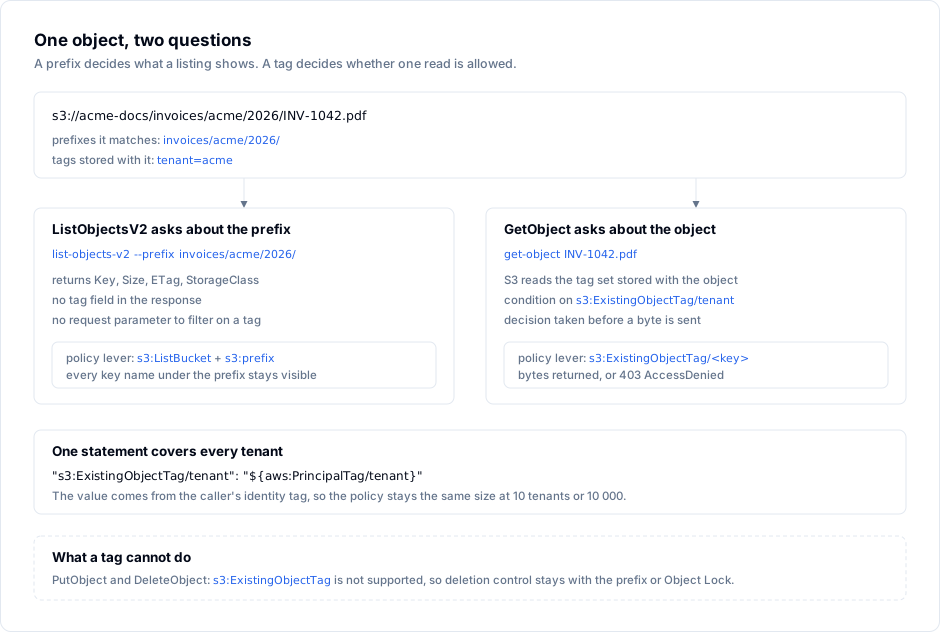
And the listing side is the part that decides the whole design. ListObjectsV2 returns Key, LastModified, ETag, Size, StorageClass and Owner. There is no tag field in the response, and no request parameter to filter by one. Tags are only visible through GetObjectTagging, one object at a time. A principal with s3:ListBucket on the whole bucket therefore sees every key name, including the tenants it cannot read.
That asymmetry is not a bug to work around. It is the shape of the system: prefix answers "what is here", tag answers "may I have this one".
Where it bites
1. Anyone who can tag can grant themselves access. A role with s3:PutObject and s3:PutObjectTagging on acme-docs/* can upload a file, tag it tenant=acme, and read it back — or re-tag an existing file it owns and read that. The tag condition is a trust boundary only if tag-writing is restricted. AWS provides s3:RequestObjectTag/environment precisely for this: every write must carry an approved tag set, so tenant cannot be arbitrary.
2. The delete gap is real and surprising. The AWS documentation is explicit that s3:ExistingObjectTag is not supported for PutObject and DeleteObject: "you cannot create a policy to grant or deny a user permissions to delete or overwrite an object based on its existing tags." A policy written as "tenants may delete only their own objects, by tag" does not do that. It does nothing on the delete path, and DeleteObject returns 204 No Content while the data goes. Deletion control is prefix-based, or it is Object Lock, or it does not exist.
3. Prefix policies die at the 20 KB wall. A bucket policy is limited to 20 KB. A single realistic tenant statement — Sid, Principal, two actions, one resource ARN, two tag conditions — measures 333 bytes when minified. That is about 61 statements before the policy will not save, and you still need the bucket-level statements for listing, uploads and the admin role. The symptom is not an error at design time; it is a MalformedPolicy: Policy has invalid resource or a silent truncation during a Terraform apply, on the day the sixty-second customer signs.
The usual reaction is one bucket per tenant. That works, costs you cross-bucket reporting and a bucket quota per account, and multiplies every automation by N.
4. Tags do not travel everywhere. CopyObject defaults to x-amz-tagging-directive: COPY, so an ordinary copy keeps the tag set — good. But S3 directory buckets (Express One Zone) support only an empty tag set and return 501 Not Implemented when a copy would bring non-empty tags across. And Cloudflare R2 implements no tagging at all: GetObjectTagging, PutObjectTagging and DeleteObjectTagging are listed as unimplemented in the R2 S3 compatibility matrix, and x-amz-tagging is rejected on PutObject. An access model built on s3:ExistingObjectTag is an AWS general-purpose-bucket model, and migrating to R2 later means rewriting the authorisation layer and re-keying the namespace.
5. An untagged object becomes invisible, not just unreadable. Every write path must tag: the SDK upload, the Lambda, the Airflow task, the CSV someone dropped in with aws s3 cp. Miss one and those objects fail every tag condition, which after a policy cleanup reads as "the file disappeared". Worse, GetObject on a denied object returns 403 AccessDenied — identical to the message for a key that does not exist, and one of the several ways the five-gate evaluation order can refuse a request while reporting nothing useful — so the first hour of the incident is usually spent proving the file is still there:
An error occurred (AccessDenied) when calling the GetObject operation: Access Denied
6. Enumerating tags is a request-per-object job. Filtering a listing client-side means one GetObjectTagging call per key. On a million objects that is a million GET requests — $0.40 in request charges at $0.0004 per 1,000, which is trivial, and roughly 5.5 hours of wall clock at 50 requests per second, which is not. Worked example: your own latency per call sets the real number, and S3 does not batch tag reads.
Doing it right
Step 1 — split the two jobs on paper. Write one sentence and keep it: prefixes name the namespace a principal may list; tags carry the attributes that decide what it may read. Any key that encodes a security attribute is a key you can never rename.
Step 2 — tag at write time, from the first object.
aws s3 cp invoice-1042.pdf \
  s3://acme-docs/invoices/acme/2026/INV-1042.pdf \
  --tagging "tenant=acme&environment=production"
The caller needs s3:PutObjectTagging in addition to s3:PutObject. Grant both, or neither.
Step 3 — write one statement, not one per tenant. Pair the object tag with the caller's own identity tag. aws:PrincipalTag/tenant is filled from the role session, so a single statement serves every tenant:
{
  "Sid": "ReadOwnTenantObjects",
  "Effect": "Allow",
  "Principal": {"AWS": "arn:aws:iam::111122223333:role/SupportReadOnly"},
  "Action": ["s3:GetObject", "s3:GetObjectVersion"],
  "Resource": "arn:aws:s3:::acme-docs/invoices/*",
  "Condition": {
    "StringEquals": {
      "s3:ExistingObjectTag/tenant": "${aws:PrincipalTag/tenant}",
      "s3:ExistingObjectTag/environment": "production"
    }
  }
}
This is the whole reason ABAC scales: the policy size is constant, whether you have 10 tenants or 10,000. Set the principal tag where the session is minted, and never let a caller supply it:
aws sts assume-role \
  --role-arn arn:aws:iam::111122223333:role/SupportReadOnly \
  --role-session-name support-acme \
  --tags Key=tenant,Value=acme
Step 4 — label what already exists before you switch the policy on. S3 Batch Operations runs a tagging job over an inventory: $0.25 per job plus $1 per million objects. Ten million objects is $10.25 and one afternoon, not a rewrite. Until the job completes, keep the old prefix policy in place — the two can coexist.
Step 5 — lock the tag-writing path. Deny s3:PutObjectTagging and s3:PutObject without an approved tag set, so nobody can mint access:
{
  "Sid": "RequireApprovedTagsOnWrite",
  "Effect": "Deny",
  "Principal": "*",
  "Action": ["s3:PutObject", "s3:PutObjectTagging"],
  "Resource": "arn:aws:s3:::acme-docs/*",
  "Condition": {
    "Null": {"s3:RequestObjectTag/tenant": "true"}
  }
}
Step 6 — keep the delete control where it works. A prefix deny or Object Lock retention, depending on whether the requirement is "cannot delete" or "cannot delete yet". Verify with a real delete attempt from a test principal, not by reading the policy.
Step 7 — verify the read path per tenant. aws s3api get-object-tagging confirms what is stored; a GetObject with the tenant's role confirms what is authorised. Both, on the same key, before you call it done.
How S3 Explorer fits
Tag-based authorisation produces exactly the confusion this article describes: a key that is listed and then refuses to open. S3 Explorer lets you look at both halves of that from one window — the folder navigation shows the prefix tree a principal actually sees, and the object's Metadata tab shows what the bucket stores for that key, so you can tell a mis-tagged object from a mis-scoped policy before you edit anything. The connection test on the connection form reports how many buckets the credentials can see before you save the profile, which is the fastest way to check that a support role has the namespace you think it has. It connects to 25 S3-compatible providers; a read-only key is enough for everything above.
S3 Explorer — desktop client for Windows, macOS and Linux.
Checklist
- Every write path in the account tags objects — SDK uploads, functions, batch jobs and human
s3 cpruns. - Tag values come from an allow-list, enforced by
s3:RequestObjectTag, not from client input. -
PutObjectTaggingis denied to every principal that does not need to re-tag, so tagging cannot grant access. - No policy claims to restrict
PutObjectorDeleteObjectbys3:ExistingObjectTag— AWS does not evaluate it there. - The bucket policy is measured in bytes, and someone knows how many tenants remain before 20 KB.
- A listing from a tenant principal shows filenames only for prefixes that tenant may see.
- A delete attempt from a tenant principal is tested, not assumed.
- The chosen provider implements object tagging: verified for R2, directory buckets and any non-AWS endpoint before the design is approved.
Prices and limits checked on 3 November 2026 against the AWS S3 documentation and pricing pages, the AWS tagging pricing announcement ($0.0065 per 10,000 tags per month), the S3 API reference for CopyObject, and the Cloudflare R2 compatibility matrix. Request prices are the us-east-1 list rates from the S3 pricing page.