Chained AssumeRole sessions stop at one hour, silently
A role that assumes another role gets 3600 seconds, whatever its MaxSessionDuration allows. The exact error, and the batch job that dies at minute 61.
A nightly job ran for three weeks, then stopped at 01:00:03 with 400 Bad Request. The error named a token — not a bucket, not a policy. Nothing had been deployed; the only change was the size of the dataset, from fifty minutes of work to seventy.
The credentials had an expiry printed on them, and nobody had read it.
The short version
- Software does not log into S3 with a password. It gets a short-lived pass — an access key, a secret, and a session token — with an expiry written inside. Every request carries it.
- A role can use its own pass to fetch another role's pass. That second pass is capped at 3600 seconds by AWS STS, whatever the maximum session duration of either role says. It is the one place in IAM where a role's own setting stops applying.
- Ask for longer and the call fails immediately with a
ValidationError. Ask for nothing and you get 3600 seconds without warning — which is how a forty-minute staging run turns into a four-hour production job that dies at the hour mark. - The failure is not retryable: S3 answers
400 ExpiredToken, and every part already uploaded to an unfinished multipart upload keeps billing at $0.023/GB-month until something aborts it.
What actually happens
When a program needs S3 access it calls sts:AssumeRole and receives three strings plus an Expiration timestamp. The three strings are handed to the SDK; the timestamp is usually thrown away. That timestamp is the whole subject of this article.
DurationSeconds takes a value from 900 to 43 200 seconds, defaults to 3600, and cannot exceed the role's MaxSessionDuration — a per-role setting that can be raised from one hour to twelve, and that defaults to one hour when the role is created. So far, everything is configurable.
The hop is what breaks it. A user with a long-term access key assumes RoleA — the initial assumption, where RoleA's own maximum applies. Then RoleA's session token assumes RoleB. That is role chaining, and AWS states the rule plainly: chaining limits the role session to a maximum of one hour, regardless of the maximum session duration configured for individual roles. Ask for more on that second call and the operation fails.
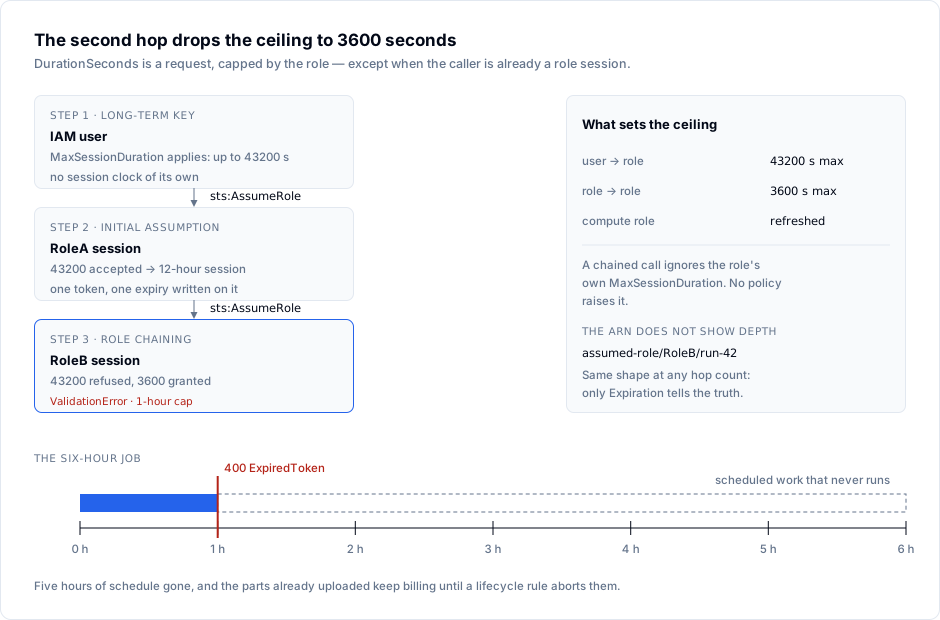
Two consequences follow, and only one is loud. The loud one: you request twelve hours on a chained call, it fails at the moment it is made, and the job never starts — annoying, easy to find.
The quiet one: you request nothing. DurationSeconds is optional, so AssumeRole returns 3600 seconds, the job starts, and it runs until minute 60. Nothing in the response, the ARN or the logs says "this is a chained session" — the ARN has the same shape at any depth, arn:aws:sts::123456789012:assumed-role/RoleB/batch-20261102. The only observable difference is the Expiration value, and comparing it with the work is the only way to know.
Three properties matter when planning around it. A chained session cannot call GetSessionToken or GetFederationToken, so an MFA session must be minted before the first hop. Session tags survive only when declared transitive. And compute-held credentials on EC2, ECS, EKS and Lambda are not subject to the role's maximum session duration — the platform refreshes them, which is why the same code works in a container and fails on a laptop.
Where it bites
The two ways to be told no, and they are different strings:
An error occurred (ValidationError) when calling the AssumeRole operation:
The requested DurationSeconds exceeds the MaxSessionDuration set for this role.
An error occurred (ValidationError) when calling the AssumeRole operation:
The requested DurationSeconds exceeds the 1 hour session limit for roles assumed by role chaining.
The first is fixable by raising a setting. The second is not: no setting, no support case, no policy grants more than 3600 seconds on a chained assumption. Incidentally, the chained-session string never appears in a CloudTrail event — only in the caller's stderr.
Where the ceiling comes from, by caller:
| Caller | Ceiling | Default |
|---|---|---|
IAM user long-term key → AssumeRole | role's MaxSessionDuration (3600–43 200) | 3600 |
Temporary credentials → AssumeRole (chaining) | 3600 s, hard | 3600 |
| Code on EC2 / ECS / EKS / Lambda | platform-managed, refreshed | not the role setting |
The runtime failure looks like this, and it arrives in the middle of a run rather than at the start:
An error occurred (ExpiredToken) when calling the ListObjectsV2 operation:
The provided token has expired.
That is the S3 code ExpiredToken, HTTP 400, message The provided token has expired. It is a client error, so the SDK's default retry policy — throttling and server errors — does not retry it. A wrapper that retries three times burns three attempts in a second and reports a permission problem, sending whoever is on call to the bucket policy instead of the clock. The five-gate evaluation order covers that investigation.
The shared-config trap. Someone makes the chain permanent in ~/.aws/config: a batch profile whose source_profile is platform-admin, which itself assumes from a base profile. Every --profile batch call is now a chained assumption, and the duration_seconds = 43200 in that block fails on the first call. It worked while source_profile pointed at an IAM user. Nobody edited the role.
The refresh trap. A credential process that re-assumes the role looks like the fix — as long as the parent session lives, because the refresh call is signed with the parent's token. Once that expires, every refresh returns ExpiredToken and child sessions stop renewing. Two clocks, and chaining means you own both.
The tail nobody invoices. A four-hour copy that dies at hour one leaves an open multipart upload, and S3 bills its parts as storage until the upload is completed or aborted. A worked example: 250 GB left behind on S3 Standard in us-east-1 costs 250 × $0.023 = $5.75 per month, indefinitely, for a job that produced nothing. Multiply by every retry.
It is an AWS STS rule, not an S3 rule. MinIO's STS endpoint allows DurationSeconds from 900 seconds to 365 days, default one hour, set through MINIO_STS_DURATION — a default, not a chain ceiling. A workload that assumes two roles for six hours against a local MinIO dies at the hour mark on AWS. Test the number against the endpoint you ship to.
Doing it right
1. Read the expiry you were given, not the one you requested.
aws sts assume-role \
  --role-arn arn:aws:iam::123456789012:role/batch-writer \
  --role-session-name batch-20261102 \
  --duration-seconds 3600 \
  --profile platform-admin \
  --output json > /tmp/creds.json

jq -r '.Credentials.Expiration' /tmp/creds.json
date -u +%FT%TZ
Two timestamps an hour apart against a four-hour job is the bug, found before it happens. Run this from the profile the job actually uses, not from your admin profile.
2. Make the job refuse to start when the session is too short.
import datetime as dt, json

creds = json.load(open("/tmp/creds.json"))["Credentials"]
expires = dt.datetime.fromisoformat(creds["Expiration"].replace("Z", "+00:00"))
needed = dt.timedelta(hours=4)                 # measured, not guessed
now = dt.datetime.now(dt.timezone.utc)

if expires - now < needed:
    raise SystemExit(f"session ends {expires:%H:%M:%SZ}, job needs {needed}")
A job that exits in two seconds with a clear reason is a monitoring event. A job that exits after sixty minutes is an incident.
3. Remove the hop where the permissions allow it. One role carrying the union of what the two did is simpler, and keeps a twelve-hour maximum available. Where the split exists for a reason, federate straight into the target role — OIDC or SAML issues the session directly, so the first assumption is also the last.
4. If the hop stays, cut the work into sub-hour chunks. Checkpoint by key prefix or object list, re-assume per chunk, and make each chunk idempotent so a re-run overwrites rather than duplicates. Or move the long leg onto compute whose credentials the platform refreshes — an instance profile, a task role, a pod identity.
5. Abort the leftovers, so a failed run stops costing money.
cat > /tmp/abort-mpu.json <<'JSON'
{ "Rules": [ { "ID": "AbortStaleMultipart", "Status": "Enabled",
  "Filter": { "Prefix": "" },
  "AbortIncompleteMultipartUpload": { "DaysAfterInitiation": 1 } } ] }
JSON

aws s3api put-bucket-lifecycle-configuration \
  --bucket batch-output-prod \
  --lifecycle-configuration file:///tmp/abort-mpu.json
One day is aggressive on purpose: an upload that legitimately spans a day is a design that will break at the hour mark anyway.
6. Alarm on the code, not on the status class. Count ExpiredToken separately from the rest of the 4xx responses. A single occurrence means a job is already dead, and the count will tell you how many of them died at the same minute — which is what a shared credential looks like.
How S3 Explorer fits
The credentials a long job receives are worth inspecting before the job runs, and S3 Explorer's Test connection validates them and reports how many buckets they actually see before the profile is saved — a chained set that cannot list anything is caught in seconds rather than at 01:00. The per-request metrics dashboard counts the session's calls by category with an error rate computed locally, so four thousand 200s followed by a 400 reads as a change in the series instead of a line buried in a log. Multiple connection profiles let you sit on the parent role and the child role without leaving the window, and the Metadata and Versions tabs show which key and version a half-finished batch left behind. S3 Explorer runs on Windows, macOS and Linux.
Checklist
- Every profile in
~/.aws/confighas been traced: you know which ones chain. - Every
AssumeRolecall passesDurationSecondsexplicitly; nothing depends on the default. - Each job compares its measured runtime with the credential
Expirationbefore it starts work. - Work that genuinely needs more than an hour runs on compute whose credentials the platform refreshes.
- A bucket lifecycle rule aborts incomplete multipart uploads within a day.
- Alarms count
ExpiredTokenseparately from other 4xx responses. - The runbook says "re-assume", not "retry": a
400will not succeed on the second attempt. - A staging run has lasted longer than an hour before the production schedule was set.
Sources
- AWS STS — AssumeRole:
DurationSeconds900–43 200, default 3600, chaining limit. - IAM — IAM roles: role chaining applies regardless of the role's own maximum.
- IAM — Methods to assume a role: lifetime per caller; compute credentials exempt.
- Amazon S3 — Error codes:
ExpiredToken, HTTP 400. - Amazon S3 — Multipart upload overview: parts billed until completed or stopped.
- AWS S3 pricing: $0.023/GB-month,
us-east-1, checked 2 November 2026. - AWS CLI — Using an IAM role:
role_arnplussource_profile. - MinIO AIStor — STS settings: default one hour, 15 minutes to 365 days.
- Chained-session
ValidationError, reproduced: DevelopersIO.
Read from vendor documentation on 2 November 2026; error strings quoted.