Multipart upload: the 5 MiB floor and the 10,000-part ceiling
A single PUT stops at 5 GiB. Splitting a 60 GB file moves the failure rather than removing it: the 5 MiB part floor is checked last, after every byte is sent.
A 60 GB backup fails with a single PUT: the request never completes, and minutes later the client reports a dropped connection instead of a reason. Splitting the file into parts is the fix — and the moment multipart's own two walls appear, a 5 MiB minimum per part and a hard count of 10,000 parts. One is checked before the first byte, the other after the last.
The short version
- A single upload request cannot carry more than 5 GiB. Anything bigger is split into parts first, by the SDK or by you.
- Multipart allows each part between 5 MiB and 5 GiB, at most 10,000 parts per object, and no minimum on the last part.
- Part size × 10,000 must cover the object. Multiply the 5 GiB maximum part by the parts ceiling and you get 48.8 TiB, the largest object the protocol can hold.
- The 5 MiB floor is enforced at the end: all parts upload with
200, thenCompleteMultipartUploadanswers400 EntityTooSmalland the object never exists. Measured below. - The damage is bandwidth and orphaned parts, not lost files: a rejected completion leaves every part behind, billed as storage until an abort removes them.
What actually happens
Amazon S3 documents a single PUT as carrying "up to 5 GB" — 5,368,709,120 bytes, so GiB in practice — and multipart as the path for anything larger. The limits page adds three numbers: part numbers run from 1 to 10,000 inclusive, part size runs from 5 MiB to 5 GiB, and "there is no minimum size limit on the last part of your multipart upload".
That page gives the maximum object size as 48.8 TiB, while the upload guide promises "up to 50 TB". Both are the same ceiling in different units: 10,000 × 5,368,709,120 bytes is 53,687,091,200,000 bytes, or 48.83 TiB, or 53.69 TB. The maximum object size is not an independent rule. It is the parts ceiling multiplied by the maximum part, which is why raising one without the other changes nothing.
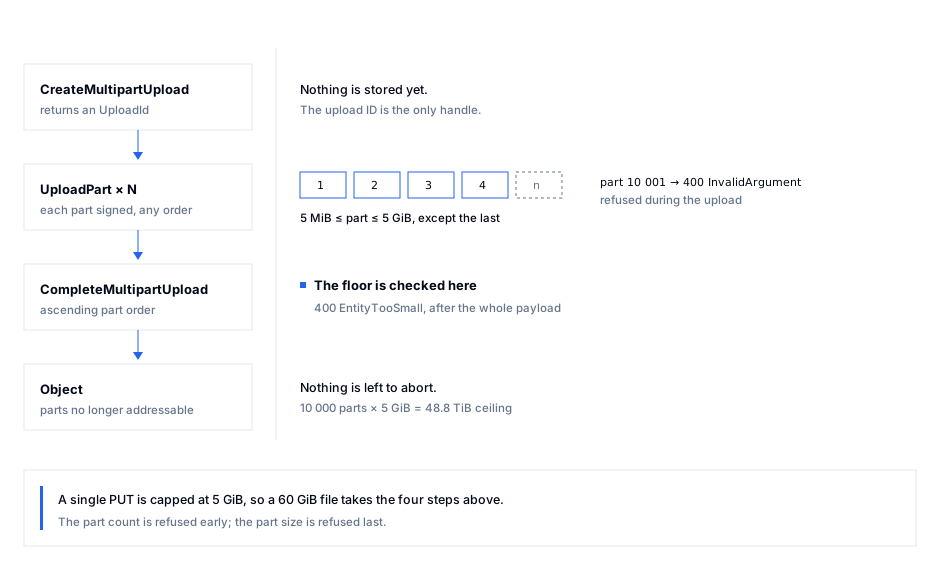
The part size is therefore a calculation, not a setting: divide the object size by 10,000 and round up to at least 5 MiB. Below that, the upload runs out of part numbers before it runs out of bytes.
What clients do with it is more interesting than the documentation. s3transfer 0.19.3 — the layer behind boto3.upload_file — ships ChunksizeAdjuster, which starts from the configured 8 MiB and doubles the chunk size until the part count fits under 10,000, then clamps the result to the 5 MiB floor and the 5 GiB ceiling. Called here through the library's own function, so these are the client's numbers, not mine:
| Object | Minimum part to fit 10,000 | Part size the SDK picks | Parts | Last part |
|---|---|---|---|---|
| 60 GiB | 6,442,451 B (6.1 MiB) | 8 MiB | 7,680 | 8 MiB |
| 500 GiB | 53,687,092 B (51.2 MiB) | 64 MiB | 8,000 | 64 MiB |
| 1 TiB | 109,951,163 B (104.9 MiB) | 128 MiB | 8,192 | 128 MiB |
| 5 TiB | 549,755,814 B (524.3 MiB) | 1 GiB | 5,120 | 1 GiB |
| 48.8 TiB | 5,365,616,744 B (5.0 GiB) | 5 GiB | 9,995 | 1.2 GiB |
python3 scripts/multipart-probe.py plan
The doubling matters. A 5 TiB object needs 524 MiB parts; the library ships 1 GiB parts, twice the necessary size. When a part fails, the retry re-sends 1 GiB instead of 524 MiB — at 100 Mbit/s, about 90 seconds, paid again on every retry. For very large objects, pass multipart_chunksize explicitly.
Where it bites
I ran four uploads against SeaweedFS 4.50 — weed server -s3, a container on the same machine at http://127.0.0.1:18333 — with boto3 1.43.125. Every part uploaded with a 200. Then:
| Parts sent | Result |
|---|---|
| 1 MiB, 1 MiB, 1 MiB, 1 KiB | 400 EntityTooSmall — "Your proposed upload is smaller than the minimum allowed object size." |
| 5 MiB − 1 byte, 1 MiB | 400 EntityTooSmall — same message |
| 5 MiB, 5 MiB, 1 KiB | object stored, 10,486,784 bytes, ETag "fd20d710…-3" |
| 1 KiB, single part | object stored, 1,024 bytes, ETag "64a3b22c…-1" |
python3 scripts/multipart-probe.py probe http://127.0.0.1:18333
The floor is a completion-time check. In the first two rows every UploadPart succeeded; the rejection came on CompleteMultipartUpload, after the whole payload had crossed the network. A client that retries re-sends the same wrong part size and fails identically. The upload looks healthy until the last call.
It is a floor, exactly. 5,242,880 bytes passes, 5,242,879 does not. Code that derives a part size by integer division gets it wrong on the remainder.
The last part is exempt, and must be. A 10,486,784-byte object finished with a 1,024-byte part. Code that pads the final part to 5 MiB uploads megabytes of nothing and corrupts the object's size.
The count is checked at a different moment, with a different code. Parts 9,999 and 10,000 were accepted; 10,001 answered 400 InvalidArgument — during the upload, not at completion, so a client that treats every 400 the same reports the wrong cause. The wording is not portable: SeaweedFS returns the terse Invalid Argument, moto 5.2.5 returns "Part number must be an integer between 1 and 10000, inclusive". Catch on the code, log the message.
A failed completion leaves the parts behind. Nothing deletes them until you write a lifecycle rule, and they are billed as storage at the object's size. An upload that dies at 90% of 5 TiB leaves about 4.5 TiB of orphaned parts — a line on an invoice rather than in a log. Abort in a finally block.
The ETag changes shape. The stored value was "fd20d710cec39419f74133c915a37638-3": the MD5 of the concatenated part MD5s with the part count appended. The file's own MD5 is a96f20bf…, so a Content-MD5 comparison against the ETag reports corruption on a perfect upload.
Provider ceilings differ. Cloudflare R2 documents multipart objects to 5 TiB with 10,000 parts and parts of 5 MiB to 5 GiB; AWS documents 48.8 TiB. Same protocol, a factor of ten apart — a pipeline sized against one endpoint hits a 400 on the other, and the message does not say which limit you met.
Sizing by the last successful upload is how this goes wrong. A 100 GiB job works with 8 MiB parts; point it at 5 TiB and the ceiling appears at part 10,001, hours in. At 8 MiB parts, 10,000 × 8 MiB = 78.1 GiB is the largest object that default ever finishes.
Orphaned parts are what the rest of an S3 bill is made of; the reverse problem, capping a single upload before it starts, is covered in presigned POST size limits.
Doing it right
1. Compute the part size from the object, not from a constant.
MIB, GIB = 1024**2, 1024**3
MAX_PARTS, MIN_PART, MAX_PART = 10_000, 5 * MIB, 5 * GIB

def part_size(object_size: int, target_parts: int = 5_000) -> int:
    """Big enough to fit in 10,000 parts, small enough to retry."""
    return max(MIN_PART, min(MAX_PART, -(-object_size // target_parts)))
Ask for 5,000 parts rather than 10,000: it leaves room for a retry without re-planning.
2. Pass it to the client explicitly. The default is not a promise.
from boto3.s3.transfer import TransferConfig

size = os.path.getsize("/backups/db-2026-11-06.tar")
cfg = TransferConfig(
    multipart_threshold=8 * MIB,
    multipart_chunksize=part_size(size),
    max_concurrency=8,
)
s3.upload_file("/backups/db-2026-11-06.tar", "backups-prod", "db/2026-11-06.tar", Config=cfg)
3. Abort in a finally. Parts survive a crashed process for as long as the upload ID does; nothing expires them.
uid = s3.create_multipart_upload(Bucket=b, Key=k)["UploadId"]
try:
    parts = [...]            # upload_part calls, collected with their ETags
    s3.complete_multipart_upload(Bucket=b, Key=k, UploadId=uid,
                                 MultipartUpload={"Parts": parts})
except Exception:
    s3.abort_multipart_upload(Bucket=b, Key=k, UploadId=uid)
    raise
4. Prove the limit on the endpoint you deploy against. Run the probe against a test bucket: a 1 MiB part must be rejected, a 5 MiB part accepted. Two calls answer what no documentation can: whether this provider enforces the floor at all.
python3 scripts/multipart-probe.py probe https://s3.eu-west-3.amazonaws.com
5. Verify what landed with the composite rule. Compare the ETag to the value computed from the part MD5s, never to the MD5 of the file.
import hashlib
md5s = b"".join(hashlib.md5(chunk).digest() for chunk in parts)
expected = f'"{hashlib.md5(md5s).hexdigest()}-{len(parts)}"'
assert s3.head_object(Bucket=b, Key=k)["ETag"] == expected
How S3 Explorer fits
These limits are protocol-level, so the useful check runs on the endpoint you actually use, often not the one in the ticket. S3 Explorer's provider picker offers 25 presets across Cloud, Specialist, Self-hosted and Enterprise plus a Custom tile for any endpoint, region and addressing style, so one bucket can be opened on AWS and on a self-hosted server from the same window. The test connection step reports how many buckets the credentials can see before a profile is saved, and the per-request metrics view counts the LIST, GET and other calls a session generated. S3 Explorer runs on Windows, macOS and Linux.
Checklist
- Every upload path computes its part size from the object size, floored at 5 MiB and capped at 5 GiB.
- No path relies on the SDK default part size for objects above 78 GiB.
- The final part keeps its real size, not padded to the minimum.
-
EntityTooSmallandInvalidPartare reported as different causes, not one "400". - Every multipart block has an
abort_multipart_uploadin afinally. - A lifecycle rule aborts incomplete multipart uploads after N days, and N is written down.
- Integrity checks compare the composite ETag with its
-Nsuffix, or the checksum headers.
Sources
- Amazon S3 — multipart upload limits: 10,000 parts, part numbers 1–10,000, part size 5 MiB–5 GiB, "no minimum size limit on the last part", maximum object size 48.8 TiB.
- Amazon S3 — uploading objects: single
PUT"up to 5 GB", console uploads to 160 GB, multipart "up to 50 TB". - Amazon S3 — CompleteMultipartUpload: parts are concatenated in ascending part-number order; a
200 OKcan still carry an error inside the body. - Amazon S3 — error code catalogue:
EntityTooSmall— "Your proposed upload is smaller than the minimum allowed object size". - Cloudflare R2 — limits and upload objects: multipart objects to 5 TiB, 10,000 parts, part size 5 MiB–5 GiB, single upload 5 GiB.
s3transfer0.19.3 —utils.py:MAX_PARTS = 10000,MIN_UPLOAD_CHUNKSIZE = 5 * (1024**2),MAX_SINGLE_UPLOAD_SIZE = 5 * (1024**3), and theChunksizeAdjusterdoubling loop.- Measured 6 November 2026 against SeaweedFS 4.50 (S3 gateway) and moto 5.2.5 with
boto31.43.125; both returnedEntityTooSmallfor a 1 MiB non-final part. The probe isscripts/multipart-probe.pyin this repository.
Keep reading
- Presigned POST: cap size and type before the upload startsA presigned PUT signs a URL, not a byte count. A POST policy adds a size range and a content-type condition that S3 enforces while the body arrives.
- The real cost of S3: 8 providers compared, egress includedStorage is 20% of your bill. We modelled 8 S3 providers across 4 workloads — backup, app, media, DR — with storage, egress, requests and replication.