Presigned URLs expire at seven days. Then what?
Seven days is not a setting: it is how long the SigV4 signing key lives. What happens at that wall, and the three patterns that outlive it.
Every sharing feature hits the same wall. Someone builds a "copy link" button, a customer forwards the link in a PDF, and eight days later the download returns a page of XML instead of a file. Nothing was broken by a bug: the link was signed with an expiry date, and that date has a ceiling nobody chose.
The short version
- A presigned URL is an ordinary link with a signature in the query string. Whoever holds it can fetch that one object, with that one HTTP method, until the time written into the link.
- On AWS the maximum is 604 800 seconds, seven days. It is not a quota you can raise in a support ticket: the SigV4 signing key is itself only valid for a week.
- Links often die earlier than they claim. Signed with a temporary role, a URL stops working when the session ends — one hour by default for
AssumeRole. Rotate an access key and every URL signed with it dies at once. - The bill is not bandwidth. It is the re-mint path you did not build: the first customer who clicks on day eight opens a ticket, and someone spends an afternoon proving the file still exists.
What actually happens
Signing is arithmetic, done on the client. The caller builds a canonical request — method, host, path, and a fixed list of X-Amz-* query parameters — then HMACs it with a signing key derived from the secret access key, the date, the region and the service name. The result goes into the URL as X-Amz-Signature. When the request arrives, S3 rebuilds the same string and compares.
The URL is the only record of its own permission: there is no table of issued links, no API to revoke one. What limits it is the parameters inside it and the credential behind it.
The seven-day ceiling follows from the signing key, not from policy: AWS states that a presigned URL can be valid for a maximum of seven days because the signing key used in the calculation is valid for up to seven days. X-Amz-Expires takes an integer from 1 to 604 800. The S3 console caps a shared link at 12 hours while the CLI and the SDKs go to 7 days — same object, two answers, depending on where you clicked.
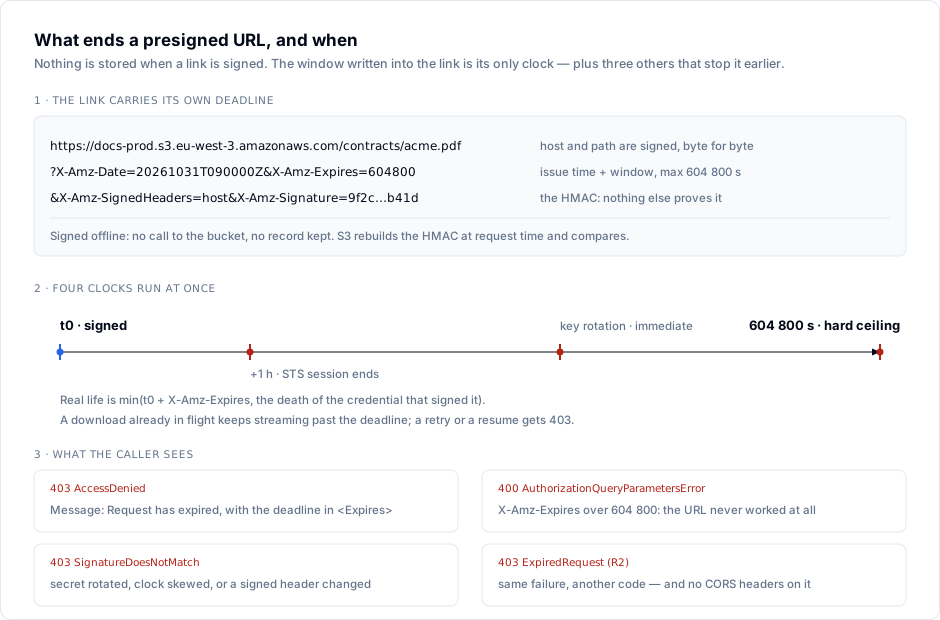
Expiry is checked when the request starts, not while it runs. AWS documents the edge case: a download that begins just before the deadline keeps streaming after it passes, but a dropped connection retried afterwards fails.
Where it bites
Read the body, not only the status code: a 403 on a presigned URL has four distinct causes.
| Response | Meaning | Usual cause |
|---|---|---|
400 AuthorizationQueryParametersError | The URL is refused before any signature check | X-Amz-Expires above 604 800 — the SDK accepted it, S3 did not |
403 AccessDenied, Message = Request has expired | The window closed | Anyone opening a link older than its X-Amz-Expires |
403 SignatureDoesNotMatch | Signature recomputed differently | Secret rotated, signed header changed in transit, clock drift on the signing host |
403 InvalidAccessKeyId | The access key no longer exists | Key deleted after the URL was minted |
403 ExpiredRequest | Same as expired | Cloudflare R2's own error code for it |
The error text for the first row is worth memorising, because it appears in logs without context: X-Amz-Expires must be less than a week (in seconds); that is, the given X-Amz-Expires must be less than 604800 seconds.
The rotation trap. Access keys get rotated on a 90-day schedule, and nothing in that runbook knows about the links you handed out last Tuesday. Delete the old key and every URL signed with it returns InvalidAccessKeyId, days before its stated expiry. Keep the old key active until the longest window you ever issue has elapsed — seven days makes deletion safe by construction.
The temporary credential trap is the one that surprises people who test in production only once. Presign inside a Lambda, an ECS task or anything assuming a role, and the link inherits the session, not the number you passed. AssumeRole defaults to a one-hour session; EC2 instance profile credentials rotate on roughly a six-hour cycle; ECS tasks get credentials valid for 1 to 6 hours. Ask for ExpiresIn=604800 from a role and you get a URL that dies in an hour.
Provider deviation. The seven-day number is a SigV4 property, but each implementation enforces it its own way. Cloudflare R2 documents an expiry between one second and 604 800 seconds and returns 403 ExpiredRequest past it — with a detail worth designing for: R2 does not send CORS headers on that error, so browser JavaScript cannot read the body and your uploader reports a generic network failure instead of "link expired". MinIO's mc share download defaults to --expire 168h and its documentation shows a 30-day example, so the ceiling there depends on the deployment, not on the AWS doc. Test the number against the endpoint you actually run.
And the security half nobody puts in the ticket. A presigned URL is a bearer token: no identity, no IP restriction by default, no record of who used it. A seven-day link pasted into a shared ticket is a seven-day password, cancellable only by destroying the credential that signed it.
Doing it right
1. Mint per request, not per share. A link that must work for a month should be minted when it is clicked, not when it is created. Store the object key; sign on demand.
# GET /files/<id>/link — behind your own authentication
obj = files.get(id, owner=current_user)          # your entitlement check

url = s3.generate_presigned_url(
    "get_object",
    Params={
        "Bucket": "docs-prod",
        "Key": obj.s3_key,
        "ResponseContentDisposition": f'attachment; filename="{obj.filename}"',
    },
    ExpiresIn=900,      # 15 minutes
)
return redirect(url, status_code=302)
ResponseContentDisposition is signed along with the request, so the filename a customer sees cannot be altered by editing the URL.
2. Cap the age in the bucket, not in the caller. A bucket policy Deny on s3:signatureAge rejects any SigV4 presigned request older than a number of seconds you set, whatever the URL claims. A Deny always wins over an Allow — the evaluation order behind that is covered in When two policies allow and the request still fails.
{
  "Version": "2012-10-17",
  "Statement": [{
    "Sid": "RejectStaleSignatures",
    "Effect": "Deny",
    "Principal": "*",
    "Action": "s3:GetObject",
    "Resource": "arn:aws:s3:::docs-prod/*",
    "Condition": { "NumericGreaterThan": { "s3:signatureAge": "900" } }
  }]
}
Deploy that and intentional links longer than 15 minutes stop working — which is the point. Accidental ones become impossible.
3. Read the window before you ship the URL. Decode what you issued, not what you asked for.
aws s3 presign s3://docs-prod/contracts/acme.pdf --expires-in 900 --region eu-west-3 > /tmp/u.txt
grep -o 'X-Amz-Date=[0-9TZ]*' /tmp/u.txt
grep -o 'X-Amz-Expires=[0-9]*' /tmp/u.txt
curl -sS -o /dev/null -w '%{http_code}\n' "$(cat /tmp/u.txt)"
Then read the failure, not just the code. curl -sS "$(cat /tmp/u.txt)" | head -8 prints the <Expires> element, which is the only thing that tells expiry apart from a permission change.
4. Rotate with the links in mind. Create the new key, deploy it, and leave the old one active for seven days — the longest any live URL can outlive it. Any shorter overlap breaks links you cannot enumerate.
5. When a link genuinely must live for months, stop using S3 presigning. Serve private content through CloudFront with origin access control and use CloudFront signed URLs: they are signed with a CloudFront key pair (RSA 2048 or ECDSA 256) and a policy whose expiry date you write, so the seven-day SigV4 signing-key limit does not apply. The bucket stays private.
aws cloudfront sign \
  --url "https://cdn.example.com/contracts/acme.pdf" \
  --key-pair-id K2JCJMDEHXQW5F \
  --private-key file://cf-signing-key.pem \
  --date-less-than 2030-01-01
Use a canned policy for one file, a custom policy when you need an IP range or a start date.
How S3 Explorer fits
Presigning happens on your machine; what you debug at 2 a.m. is which key signed, against which endpoint, for which object. S3 Explorer's connection form takes a display name, endpoint, region, path-style toggle and credentials, and Test connection reports how many buckets those credentials can actually see before you save the profile — the fastest way to tell "the link expired" from "the key lost its permission". The per-request metrics dashboard counts the session's API calls by category with an error rate, so a wall of 403s from a revoked key shows up as a number. The Metadata and Versions tabs give you the exact key, endpoint and version a signature has to match. S3 Explorer runs on Windows, macOS and Linux.
Checklist
- Every
generate_presigned_urlcall in the codebase passes an explicitExpiresIn, and none exceeds 604 800. - No presigned URL is written to a database, an email template, a CRM field or a PDF; the object key is what you persist.
- A bucket policy
Denyons3:signatureAgecaps signature age independently of what the SDK asked for. - The credentials that sign are dedicated to signing, not a human's personal access key.
- You have replayed an expired link and read the XML body, so you know which of the five 403s you get.
- The key-rotation runbook keeps the old secret alive longer than the longest URL lifetime you issue.
- Links that must outlive a week are minted at click time or served by CloudFront signed URLs.
- Your monitoring counts 403 responses by error code, not as a single "forbidden" bucket.
Sources
- Amazon S3 — Download and upload objects with presigned URLs: credential types, the 1-minute-to-12-hour console limit, the 7-day SDK limit, the
s3:signatureAgeexample. - Amazon S3 — Authenticating requests with query parameters:
X-Amz-Expiresminimum 1, maximum 604 800 exactly because the signing key lives seven days. - AWS re:Post — Resolve "Request has expired": the exact
<Error>body returned by an expired link. - Cloudflare R2 — Presigned URLs and R2 CORS: the 1-second-to-7-day range and the
ExpiredRequestbehaviour without CORS headers. - Backblaze B2 — b2_get_download_authorization:
validDurationInSecondsmaximum 604 800. - MinIO — mc share download: default
--expire 168h. - Amazon CloudFront — Use signed URLs: key groups, canned versus custom policy, expiration set in the policy.
Prices and limits read from vendor documentation on 31 October 2026; error strings quoted, not paraphrased.