Resuming a multipart upload you never meant to abandon
An upload ID never expires, so a crashed upload is resumable without the state file — measured: the part list is the real state, and it can lie about the ETag.
A 400 GB upload dies at 03:40 when the machine reboots, and the temporary file holding the part ETags goes with it. The obvious conclusion is that the transfer restarts from zero. It does not: the parts are on the server, the upload ID has no expiry, and the only thing lost was a list the server hands back in two calls.
The short version
- A multipart upload keeps three things alive between calls: an upload ID, the numbered parts already sent, and the ETag each part returned.
- The upload ID does not expire. Nothing removes it until you complete or abort the upload, so a crash leaves a resumable upload rather than a corpse.
- Recovery is two reads and one write: list the in-progress uploads, list that upload's parts, send only the missing numbers. A local state file is convenience, not authority —
ListPartsreturns the same ETag map. - Parts are billed as storage until completed or aborted, and re-sending instead of resuming costs the wall-clock time: 400 GB is about 8.9 hours at 100 Mbit/s.
- The part list is a claim, not a proof. Measured on SeaweedFS 4.50, re-sending a part number left the previous ETag in
ListPartsin 15 of 30 trials, and the completed object held the older bytes with no error. - A resume needs
s3:ListMultipartUploadPartsands3:ListBucketMultipartUploads; a credential that can onlyGetObjectandPutObjectfails on the first recovery call.
What actually happens
Three API calls wrap a loop. CreateMultipartUpload returns an opaque upload ID, each UploadPart carries a part number and returns an ETag, and CompleteMultipartUpload takes the ascending list of numbers with their ETags. Everything between those calls lives on the server, addressed by upload ID and key. The AWS upload guide states the consequence: "After you initiate a multipart upload, there is no expiry; you must explicitly complete or stop the multipart upload." No timer, no garbage collection, no eviction of a stale ID — a part sits there until something completes or aborts it, billed as stored bytes for every hour in between.
What the client loses in a crash is not the upload but the part-number-to-ETag map, which the same guide tells you to keep: "For each part upload, you must record the part number and the ETag value." The server holds that map too, reachable two ways. ListMultipartUploads returns in-progress uploads per bucket, 1,000 at a time, paged with key-marker and upload-id-marker — that is how a restart finds an ID nobody wrote down. ListParts returns one upload's parts, 1,000 at a time, paged with part-number-marker, with IsTruncated and NextPartNumberMarker when there are more.
Both ceilings behave like the 1,000-entry page that breaks listing loops: a MaxParts of 1,000 that reports truncation instead of returning everything. A 400 GB object at 16 MiB parts is 25,600 parts, so 26 ListParts pages — code that reads the first page rebuilds a completion list missing 24,600 entries.
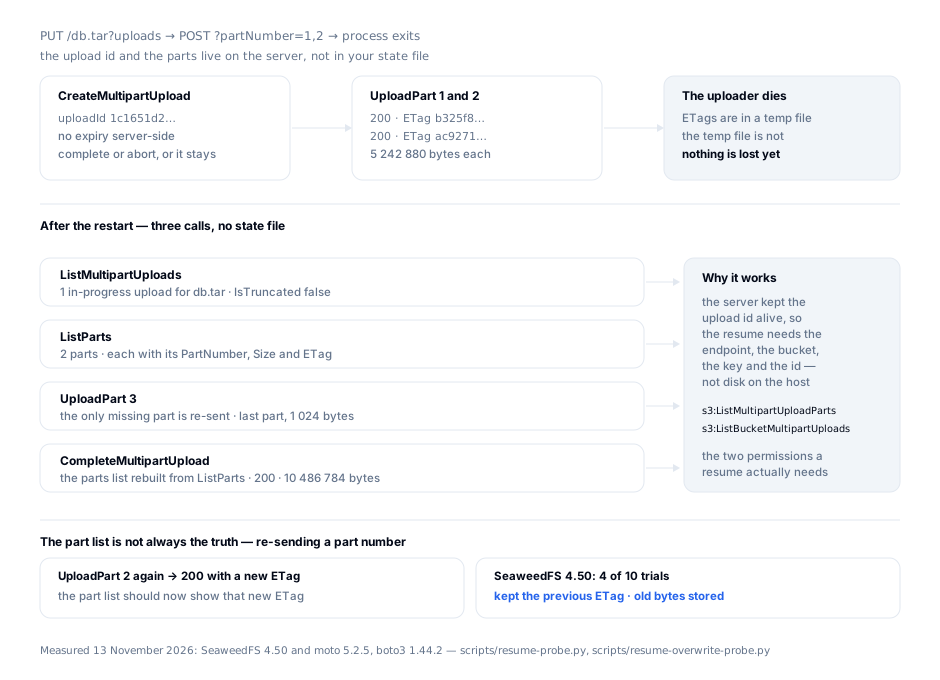
Upload IDs are not a format to validate: the same protocol produced 72 characters on SeaweedFS (1c1651d2b4add570726720ab31276b5ee10f9f39_01a1d493…) and 63 on moto (GnUwtRrY1uqTe9iQs25CPTiGkCSz7ToEgGW8MySMeOYEjCz1x3fJFkDHA).
Where it bites
Two probes ran against SeaweedFS 4.50 and moto 5.2.5 with boto3 1.44.2: 5 MiB + 5 MiB + 1 KiB, the first two parts sent, the process then treated as dead.
| Step | SeaweedFS 4.50 | moto 5.2.5 |
|---|---|---|
ListMultipartUploads finds the key | yes, 1 upload | yes, 1 upload |
ListParts | 2 parts, not truncated | 2 parts, not truncated |
MaxParts=1 | IsTruncated true, NextPartNumberMarker 1 | same |
| Complete with a wrong ETag | 400 InvalidPart | 400 InvalidPart |
| Parts out of order | 400 InvalidPartOrder | 400 InvalidPart |
ListParts, UploadPart after abort | 404 NoSuchUpload | 404, then 500 Internal Server Error |
Second CompleteMultipartUpload | accepted, no error | accepted, no error |
python3 scripts/resume-probe.py http://127.0.0.1:18334
The abort codes are not interchangeable. SeaweedFS answers 404 NoSuchUpload — "The specified multipart upload does not exist. The upload ID may be invalid, or the upload may have been aborted or completed." moto answers 500 Internal Server Error to UploadPart after an abort, so a retry loop on 5xx waits forever on an upload that no longer exists.
InvalidPartOrder is not universal. AWS documents it separately: "The list of parts was not in ascending order." moto collapses it into InvalidPart. Sorting the list makes it unreachable; merging a ListParts page with a local map brings it back.
A second completion succeeds. AWS documents NoSuchUpload for an upload that was "aborted or completed"; both endpoints returned success. A retried completion looks identical to a first one, so treat 200 and NoSuchUpload as the same terminal state and confirm with a HEAD on the key.
Re-sending a part number is not reliably an overwrite. The documentation says "if you upload a new part using the same part number as a previously uploaded part, the previously uploaded part gets overwritten", so a resume that guesses "part 2 failed, send it again" assumes new bytes win. SeaweedFS 4.50 does not always agree:
python3 scripts/resume-overwrite-probe.py http://127.0.0.1:18334 10 0
Each trial uploads a block as part 1, uploads a different block as part 1 again, reads the ETag from ListParts, completes with it and hashes the stored object. Across 30 trials the part list kept the previous ETag in 15 — 4/10 and 6/10 with no pause, 5/10 with a one-second pause before the read. Every one of those completions stored the first block. moto was stale 0 times in 15.
The failure is silent: UploadPart returns 200 with a new ETag, CompleteMultipartUpload returns 200, the object is the right length, and the bytes are the earlier attempt. Complete with the ETag returned by the UploadPart you just made, never with a value re-read from ListParts in the same session.
Two more outcomes to wire for: a resume after your lifecycle rule fired fails at the first call with NoSuchUpload — normal, not a bug — and a resumed job racing an object written under the same key can be refused with 412 Precondition Failed now that conditional writes apply to CompleteMultipartUpload. The part-size arithmetic that sets how many pages a resume walks is its own set of limits.
Doing it right
1. Write the upload ID down before the first part. Endpoint, bucket, key, upload ID, fsynced. The part map is optional because ListParts rebuilds it.
2. Find the upload by key prefix. Never scan a whole bucket; the pagination has two tokens, not one.
def find_upload(s3, bucket, key):
    kw = {"Bucket": bucket, "Prefix": key}
    while True:
        page = s3.list_multipart_uploads(**kw)
        for u in page.get("Uploads", []):
            if u["Key"] == key:
                return u["UploadId"]
        if not page.get("IsTruncated"):
            return None
        kw["KeyMarker"], kw["UploadIdMarker"] = page["NextKeyMarker"], page["NextUploadIdMarker"]
3. Rebuild the part map from the server, all pages of it. Page on NextPartNumberMarker until IsTruncated is false.
4. Send only the gaps, and trust the response over the list. Keep the ETag that UploadPart returns; re-reading ListParts to confirm is the call measured above returning stale data.
def resume(s3, bucket, key, uid, parts_have, total_parts, body_of):
    for n in range(1, total_parts + 1):
        if n in parts_have:
            continue
        parts_have[n] = {"PartNumber": n, "ETag": s3.upload_part(
            Bucket=bucket, Key=key, UploadId=uid, PartNumber=n, Body=body_of(n))["ETag"]}
    return [{"PartNumber": n, "ETag": parts_have[n]["ETag"]} for n in sorted(parts_have)]
5. Complete in ascending order, abort when you mean it, keep a backstop. sorted() is the whole ordering rule. On give-up, abort_multipart_upload frees the parts and their bill; for crashes nobody handles, add AbortIncompleteMultipartUpload with a day count longer than the longest plausible restart window — the AWS example uses 7.
How S3 Explorer fits
A resume needs three things from the endpoint before any code path is worth debugging: credentials that can list, the right bucket, and the number of calls the recovery cost. S3 Explorer's test connection reports how many buckets those credentials actually see before a profile is saved, bucket list and folder navigation open the target key without a CLI guess, and the per-request metrics view counts the LIST, GET and PUT calls a session generated — the number that shows whether a recovery loop is paging or hammering. Its provider picker carries 25 presets plus a Custom tile, so AWS and a self-hosted endpoint can be compared in one window. S3 Explorer runs on Windows, macOS and Linux.
Checklist
- The upload ID reaches durable storage before the first
UploadPart. - Recovery finds the upload by prefix and follows
NextKeyMarkerwithNextUploadIdMarker. -
ListPartsis paged onPartNumberMarkeruntilIsTruncatedis false. - Completion uses one merged map, sorted ascending, never the first page alone.
- A re-sent part completes with the ETag from that
UploadPartresponse, not a re-read. -
NoSuchUploadon the first recovery call is handled as "gone, start over", not alerted on. - No retry loop on 5xx without a
HEADon the key first. - A lifecycle
AbortIncompleteMultipartUploadrule exists, with a day count longer than the restart window.
Sources
- Amazon S3 — multipart upload overview: "no expiry" for upload IDs, the ETag recording requirement, the same-part-number overwrite rule,
s3:ListMultipartUploadPartsands3:ListBucketMultipartUploads, conditional writes onCompleteMultipartUpload. - ListParts and ListMultipartUploads: 1,000 per response, and the pagination fields.
- Amazon S3 — error code catalogue:
NoSuchUpload(404),InvalidPart,InvalidPartOrder(400). - Aborting a multipart upload and the
AbortIncompleteMultipartUploadrule: parts are billed until aborted; the 7-day example. - Measured 13 November 2026 with
boto31.44.2 against SeaweedFS 4.50 (weed server -s3) and moto 5.2.5, usingscripts/resume-probe.pyandscripts/resume-overwrite-probe.pyin this repository — both print the exact code and message the endpoint returned.
Keep reading
- Multipart upload: the 5 MiB floor and the 10,000-part ceilingA single PUT stops at 5 GiB. Splitting a 60 GB file moves the failure rather than removing it: the 5 MiB part floor is checked last, after every byte is sent.
- S3 LIST returns 1,000 entries a page, folders includedOne ListObjectsV2 response holds at most 1,000 entries, and a folder rollup spends one of them. Measured on two endpoints, plus the loop that stops too early.